


Product details
- Brand
- Yealink
- Color / finish
- Black
- Product type
- Teams DECT headset with touchscreen UC workstation
Description
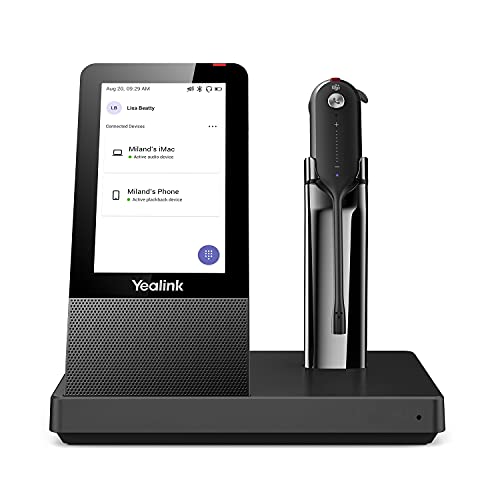
WH67 puts headset charging, call controls and a speakerphone into one desktop base. The lightweight mono earpiece lets you take a call away from the desk, then return to the base when you want hands-free room audio. Convertible wearing accessories make it possible to try a fit other than a conventional two-ear headset.
The wireless links have different jobs. The earpiece communicates with the base over DECT; the base connects to computers or supported desk phones through USB and can pair with mobile devices over Bluetooth. It is not simply a Bluetooth earpiece that connects directly to every telephone. Confirm the exact phone model and firmware in Yealink’s compatibility guide.
Features
- Touchscreen base: A 4-inch display provides a visible place for call and device controls.
- Convertible mono headset: Choose the supplied earhook, headband or neckband arrangement to suit your fit.
- DECT roaming: The manufacturer quotes up to 120 m / 394 ft under suitable conditions.
- Integrated speakerphone: Switch to the base for a hands-free call when you do not want to wear the headset.
- Computer and mobile links: USB and base Bluetooth bring supported devices to one workstation.
- Dual-microphone processing: Yealink Acoustic Shield processing is designed to reduce unwanted sound sent during calls.

Specifications
| Model / platform | WH67, Microsoft Teams listing |
|---|---|
| Base screen | 4.0 in, 480 × 800 capacitive touchscreen |
| Headset connection | DECT to base |
| Base connections | USB and Bluetooth |
| Rated talk time | Up to 7 hours |
| Rated wireless range | Up to 120 m / 394 ft; environment dependent |
| Headset weight | Approximately 19 g |
| Charging time | Approximately 2.5 hours with specified power supply |
Match the workstation to your phone system
For a computer softphone, connect the base by USB and select the Yealink devices in the call application. For a desk phone, check compatibility before buying: a physical USB socket alone does not establish headset call control. Place the base where the touchscreen is reachable and make a test call using both the earpiece and speakerphone.
| Walls and distance | The maximum range is not a promise through brick, metal or several floors. |
|---|---|
| Wearing accessories | Try the supplied fits and eartip sizes before a long shift. |
| Optional accessories | A wireless mobile-phone charging stand is not established as part of this listing. |
What's included
- WH67 base and convertible headset
- Earhook/eartips, headband and neckband
- Power adapter and USB cables
Common questions
Does the earpiece pair directly to my mobile by Bluetooth?
The headset uses DECT to its base. Pair a supported mobile phone with the base’s Bluetooth connection.
Is the phone shown in lifestyle images included?
No. This is the headset workstation; phones and computers are separate.
Will it work with every Yealink or Poly desk phone?
No blanket compatibility is claimed. Check Yealink’s current compatibility guide for the exact phone and connection.
Can I use it without wearing the headset?
Yes. The base has a speakerphone for supported connected calls.
Product information & sources
Product details checked against the supplied catalog information and the references below. Yealink WH67 technical specifications; Yealink WH67 Teams product and compatibility guidance. Reviewed September 2026.
Need help choosing? Contact Eco Home Office. See our shipping details and returns policy.