


Product details
- Brand
- Ergotron
- Color / finish
- Black
- Product type
- Desktop sit-stand converter with adjustable keyboard tray
Description
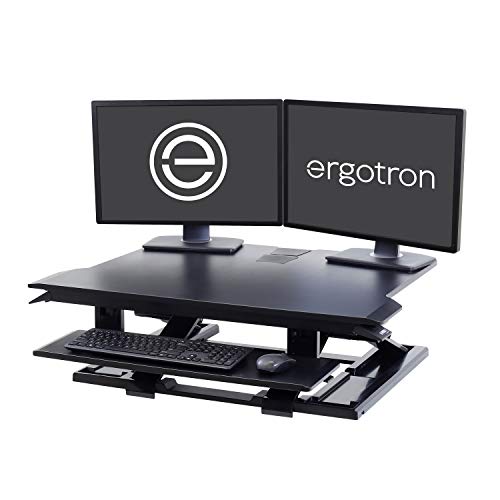
WorkFit-TX is designed for a workstation where screen height and typing height need separate attention. Its upper platform carries the monitor setup, while the keyboard tray offers additional adjustment instead of remaining at one fixed distance below the surface. That flexibility is particularly useful when changing between seated and standing work.
The surface is 32 inches wide and 27 inches deep. This gives equipment a substantial front-to-back area, but it also makes checking the host desk important. Plan around the actual platform and base, the keyboard’s position at the front edge, and the weight of the converter itself as well as its supported equipment.
Features
- Independent keyboard height: The tray provides 3 inches of adjustment relative to the upper surface.
- Backward keyboard tilt: The typing surface can angle away from the user.
- Straight lift: The converter raises over the desk instead of sweeping forward.
- 32-inch upper platform: Accommodates compatible monitor stands or a monitor-and-laptop arrangement.
- Manual adjustment: No motor, wall outlet or powered control is required.
- Desktop placement: The assembled converter rests on its supporting desk without drilling.

Specifications
| Model / SKU | WorkFit-TX / 33-467-921 |
|---|---|
| Upper surface | 32 × 27 in |
| Keyboard tray | 28 × 8 in |
| Equipment load range | 10–40 lb |
| Keyboard height adjustment | 3 in, independently of upper platform |
| Keyboard backward tilt | Up to 10° |
| Lift mechanism | Manual |
| Installation | Desktop placement; no clamp |
Set the keyboard position before arranging the screens
Start seated with your usual chair and adjust the keyboard so your elbows remain close to your body. Then position the displays to suit the viewing distance. Repeat at standing height, making small adjustments rather than assuming the highest setting is the best one. The adjustable tray helps separate these two decisions.
| Two displays | Check both stand bases and their combined load; screen diagonal alone does not establish fit. |
|---|---|
| Desk depth | Measure available support and usable reach before placing a deep converter on a shallow desk. |
| Accessories | Include laptop stands, speakers and other items in the 10–40 lb equipment total. |

Common questions
How does TX differ from a fixed-tray converter?
Its keyboard tray has its own height adjustment and backward tilt, allowing more control over typing position.
Do I need to drill my desk?
No. It rests on the desktop; the desk must be stable and able to support the loaded converter.
Are the monitors or a monitor arm included?
No. The workstation shown with monitors illustrates a setup. Computer equipment and optional arms are separate.
Can the load be below 10 lb?
The specified equipment range starts at 10 lb. Check the full supported load range when planning a lightweight setup.
Product information & sources
Product details checked against the supplied catalog information and the references below. Ergotron WorkFit-TX manufacturer specification sheet. Reviewed September 2026.
Need help choosing? Contact Eco Home Office. See our shipping details and returns policy.