


Product details
- Brand
- Canon
- Color / finish
- White
- Product type
- Pigment ink-tank all-in-one office printer
Description
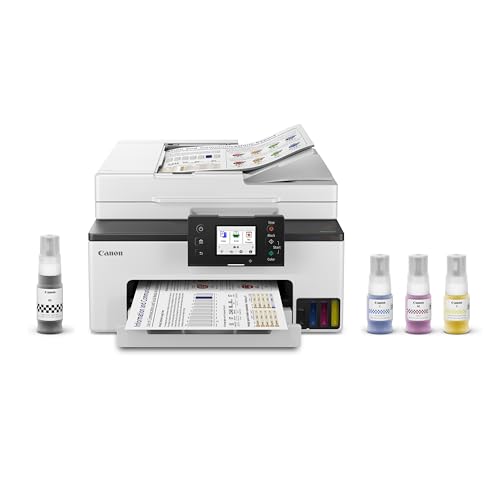
The MAXIFY GX2020 is built for routine paperwork in a home office where desk space matters. Its refillable pigment-ink system suits invoices, worksheets and color business graphics, while the front-loading cassette keeps the regular paper supply together.
It includes fax as well as print, copy and scan. The 35-sheet feeder saves repeated flatbed placement for suitable multi-page originals, but it is a single-sided feeder: automatic two-sided printing does not mean automatic two-sided scanning. That difference matters if you frequently archive double-sided documents.
Features
- Four pigment ink tanks: use Canon GI-25 black, cyan, magenta and yellow bottles.
- Automatic two-sided printing: reduces manual handling for supported paper and jobs.
- 250-sheet front cassette: holds the everyday paper supply.
- 35-sheet ADF: handles Letter-size batches; Legal capacity is lower.
- 2.7-inch touchscreen: provides local control for copying and scan or fax tasks.

Specifications
- Main cassette
- 250 sheets
- Letter ADF
- 35 sheets
- Ink colors
- 4 pigment tanks
| Model | MAXIFY GX2020 |
|---|---|
| Functions | Print, copy, scan and fax |
| ISO print rate | 15 ipm black / 10 ipm color |
| Ink family | Canon GI-25 pigment bottles |
| Paper cassette | 250 sheets |
| Document feeder | 35 Letter sheets or 5 Legal sheets; simplex |
| Flatbed | Letter/A4 class |
| Display | 2.7-inch color touchscreen |
| Connections | Wi-Fi and USB |
A practical fit for recurring paperwork
Plan ink purchases around your actual color coverage rather than an advertised number of years. A mostly text-based office and one printing large color graphics can use the same bottles at very different rates. Initial tank filling and routine maintenance also use ink, so a bottle-yield test is not an exact forecast for every installation.
| Two-sided reports | Use automatic duplex printing on approved plain paper. |
|---|---|
| Single-sided packets | Use the ADF and save a clearly named multi-page PDF. |
| Two-sided originals | Plan a manual second-side workflow or choose a duplex-scanning model. |
| Legal documents | Observe the ADF’s five-sheet Legal capacity and supported original size. |
Common questions
Does the GX2020 include fax?
Yes. This model supports print, copy, scan and fax, even when an abbreviated listing describes it as a three-in-one. A suitable telephone connection is needed for its fax function.
Does it scan two-sided originals automatically?
No. The ADF scans one side at a time. Duplex printing is a separate feature and does not change the scanning hardware.
Can I replace the maintenance cartridge?
Canon provides a user-replaceable maintenance cartridge and print-head servicing procedure. Follow the model-specific instructions and replacement-part guidance.
Is it a six-color photo printer?
No. Its four pigment inks are intended for office documents and graphics. A photo-focused model uses a different ink system and feature balance.
Product information & sources
Model details checked against the exact catalog listing and manufacturer references. Software, network services and operating-system support should be checked for your intended setup. Canon MAXIFY GX2020 specifications and support; Canon GX2020 official brochure. Reviewed September 2026.
Need help choosing? Contact Eco Home Office. See our shipping details and returns policy.