
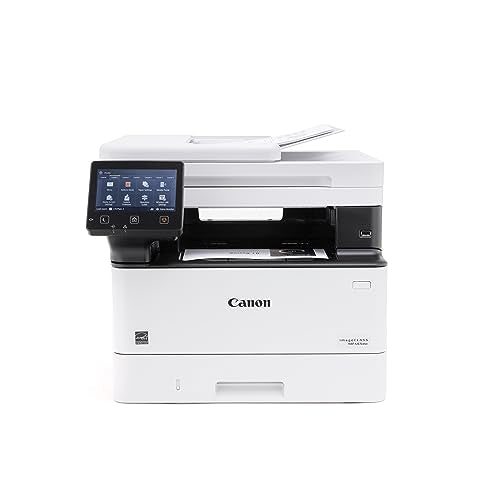


Product details
- Brand
- Canon
- Color / finish
- White
- Product type
- Monochrome laser multifunction printer
Description
The imageCLASS MF465dw suits a home office or small team that prints contracts, reports and other text-heavy documents. Its laser engine produces black-and-white output at up to 42 letter-size pages per minute, while automatic duplex printing makes two-sided documents straightforward.
For incoming paperwork, the 50-sheet feeder scans both sides in one pass and can capture color originals even though printed output is monochrome. A 5-inch touchscreen brings copying, scanning and fax controls together. This listing is for the original MF465dw, with Canon 070-series toner compatibility.
Features
- Four office functions: print, copy, scan and fax from one machine.
- Single-pass duplex scanning: captures both sides of suitable originals without a second feed.
- 350-sheet standard input: combines a 250-sheet cassette with a 100-sheet multipurpose tray.
- 5-inch touchscreen: provides a clear interface for frequently used office tasks.
- Network flexibility: USB, Ethernet and Wi-Fi support local or shared placement.
- Mobile printing: supports compatible Apple AirPrint and Mopria workflows, plus Wi-Fi Direct.

Specifications
- Letter print speed
- 42 ppm
- Scan feeder
- 50 sheets
- Standard input
- 350 sheets
| Functions | Monochrome print / copy; color scan; fax |
|---|---|
| Print resolution | Up to 1200 × 1200 dpi |
| Scan resolution | Up to 600 × 600 dpi |
| Maximum standard paper size | 8.5 × 14 in / legal |
| Toner | Canon 070 or optional high-capacity 070 H |
| Recommended monthly volume | 750–4,000 pages |
| Dimensions | 16.6 W × 18.1 D × 14.8 H in |
| Weight | 34.4 lb |
42 ppm is the manufacturer's letter-size print rating. Duplex jobs, first-page time, scan processing and document complexity affect total job time. Optional paper capacity requires the separate AH-1 cassette.
Plan supplies and paper handling
Toner yield is a comparison figure, not a guaranteed number of finished documents. Coverage, graphics and job mix influence replacement frequency. Allow room to open covers, load paper and lift the scanner lid when positioning the machine.
| Everyday reports | Keep standard paper in the main cassette and choose automatic two-sided output when appropriate. |
|---|---|
| Special media | Use the multipurpose tray with the correct media type and size settings. |
| Replacement toner | 070 is rated for approximately 3,000 pages; 070 H for 10,200 pages under the stated ISO test. |
| Scan workflow | Test destination access and page order before scanning a large client or project file. |
What's included
- Canon imageCLASS MF465dw printer
- Canon 070 black toner cartridge
- Power cord and telephone cable
- Documentation and setup software materials
Optional 550-sheet cassette and high-capacity replacement toner are separate. Fax requires a compatible telephone connection.
Common questions
Does it print in color?
No. Printing and copying are black and white. The scanner can capture color documents for digital files.
Does it scan both sides in one pass?
Yes. The 50-sheet automatic feeder supports one-pass two-sided scanning.
Is this the MF465dw II?
No. This product is the original MF465dw. Use its exact model name when selecting drivers, instructions and accessories.
Which toner should I buy?
Use the Canon 070 family specified for this model: standard 070 or high-capacity 070 H. Match the cartridge to the machine and sales region before ordering.
Product information & sources
Specifications refer to the original MF465dw, matching UPC 013803356885. Later II-model claims, manufacturer-direct promotions and service terms have not been transferred. Canon: original imageCLASS MF465dw specifications and package; Canon: MF462dw / MF465dw brochure. Reviewed September 2026.
Need help choosing? Contact Eco Home Office. See our shipping details and returns policy.