
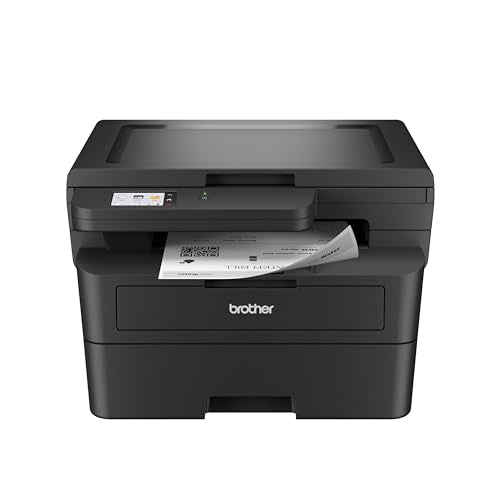


Product details
- Brand
- Brother
- Color / finish
- Black
- Product type
- Monochrome laser printer with flatbed scanner
Description
The HL-L2480DW suits a desk that prints many text documents but only scans a few originals at a time. It produces black-and-white output and includes a flatbed for copying forms or capturing a color original digitally. Color scanning does not mean it can print in color.
The flatbed-only design is important: there is no automatic document feeder. It keeps the machine relatively compact, but multi-page originals must be placed on the glass individually. Choose it for contracts, return labels and everyday paperwork where printing is the main job.
Features
- Automatic duplex printing: prints supported documents on both sides without reinserting the paper.
- Flatbed scan and copy: handles individual originals, including items unsuitable for a feeder.
- 250-sheet tray: holds a useful supply of plain paper for recurring print jobs.
- Single-sheet manual feed: accommodates supported envelopes and specialty media.
- Wired and wireless networking: combines Ethernet, dual-band Wi-Fi and a USB computer connection.

Specifications
- Print speed
- 36 ppm max.
- Main tray
- 250 sheets
- Touchscreen
- 2.7 in.
| Model | HL-L2480DW |
|---|---|
| Functions | Monochrome print/copy; color and monochrome scan |
| Rated print speed | Up to 36 ppm, Letter single-sided |
| Automatic duplex | Printing |
| Document glass | Up to 8.5 × 11 inches |
| Automatic document feeder | None |
| Paper input | 250-sheet tray plus single-sheet manual feed |
| Display | 2.7-inch color touchscreen |
| Consumables | TN830 / TN830XL toner; separate DR830 drum |
A practical desk-printing setup
Put frequently used plain paper in the main tray and use the manual slot for occasional media changes. Keep the area above the lid clear so copying an ID or scanning a page does not require moving a shelf or monitor.
| Text-heavy work | Monochrome laser output is the core purpose of this model. |
|---|---|
| A color original | Save a color digital scan; the printed copy remains black and white. |
| Several scan pages | Place each original on the glass and combine them in compatible scanning software. |
| Supply replacement | Toner and drum have separate replacement cycles; identify the part requested by the printer. |
Common questions
Is this only a printer despite the HL name?
No. This exact HL-L2480DW includes flatbed scanning and copying as well as printing. Model names alone are not enough to determine functions.
Does it scan a stack automatically?
No. There is no ADF. Choose a feeder-equipped model if routine scanning involves many loose pages.
Does it print color?
No. It prints and copies in black and white. It can capture a color original as a digital scan.
Do I have to enroll in Refresh?
No. The optional subscription is separate from ordinary printer use with suitable retail toner. Check any current offer terms if you want the subscription.
Product information & sources
Model details checked against the exact catalog listing and manufacturer references. Software, network services and operating-system support should be checked for your intended setup. Brother HL-L2480DW specifications; Brother current manuals and drivers. Reviewed September 2026.
Need help choosing? Contact Eco Home Office. See our shipping details and returns policy.